
Generate Hybrid BULK X509 Certificates
This tool generates up to 100 X509 hybrid certificates. Information used to generate the certificates can come from a ZIP file of certificate signing requests (CSRs), a CSV file or entered manually using the UI. If an alternate signing key is used the signature algorithm and value are included as AltSignature extensions.
Requirements/Restrictions:
CSR ZIP File
Certificate generation may use a CSR file. The number of certificates generated is directly determined by how many
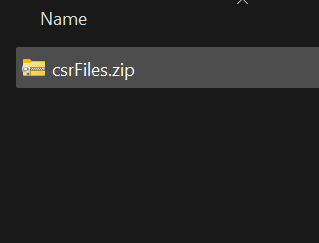
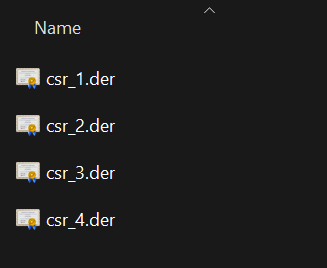
CSRs are provided in the ZIP file. The structure of the ZIP file is important. Do not include any folder/directories in the ZIP file.
The ZIP file should only be a collection of the CSRs in either PEM or DER format, do not include sub-directories.
Subject Public Keys
The subject public keys (primary and alternate) may come from the CSR files or be generated by the tool. If they are generated by the tool,
the associated private keys will be included in the certificate ZIP file download. The alternate public key is included as a SubjectAltPublicKeyInfo extension.
Warning: these private keys should only be used for test and development purposes.
Subject DN - Common Name
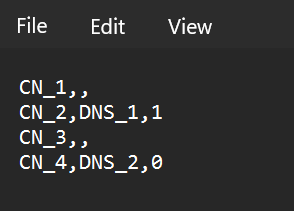
All generated Certificates require a unique Common Name RDN. The common names will be supplied by one of two ways.
If the Subject DN from the CSR is used, the common name will be pulled from the CSR. If the a new Subject DN is used the
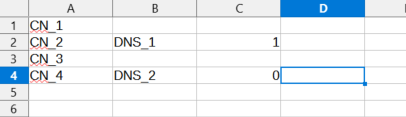
common name will be provided by a CSV file. The first column in the CSV file is reserved for the common name. Do not add
column headers.
The number of CSRs provided in the ZIP file MUST match the number of unique common names in the CSV files first column.
Extension Requests and Subject Alternative Name - DNS Name
This bulk generation supports unique Subject Alternative Name - DNS Names in the Extensions Requests. DNS Names can be provided
in one of two ways. One - If the extensions requests from the CSR are used the DNS Name will be pulled from the CSR.
Two - If new extension requests are generated the DNS Name extension can be selected. If so, the CSV file will need to be provided.
The second column of the CSV file is reserved for
the unique DNS names. The count of unique DNS names MUST match the count of provided CSRs. The third column is reserved for
the DNS name critical status. To represent critical place a '1', non-critical place a '0' (or leave it empty). The third column
will not be checked unless a DNS Name is provided for that row.
Do not add more information past the specified columns, it will not be checked and could impact processing.
CSR ZIP File Example:
1
2
CSV File Example:
1
2